We want to ship more features each week. To do that, we need a fast, repeatable way to test each change and share a working version for review.
In busy weeks, we complete 100+ tickets across new features, bug fixes, and internal improvements. Keeping that pace means testing needs to be easy to start and repeat.
In a microservice app, even one API change needs the services it calls, useful test data, and a URL someone else can open. We wanted engineers and product managers to get that environment without setting up the whole app each time. We also wanted an AI agent to deploy the change, run checks, and bring back the results.
So we built staging around a shared base. Each person or feature branch gets a Kubernetes namespace, a named space inside one cluster. We start copies of the services they need to change and use shared services where the test allows it.
Once that setup worked through a command, a Slack agent could call it, run checks, and return a URL with screenshots or video.
The setup
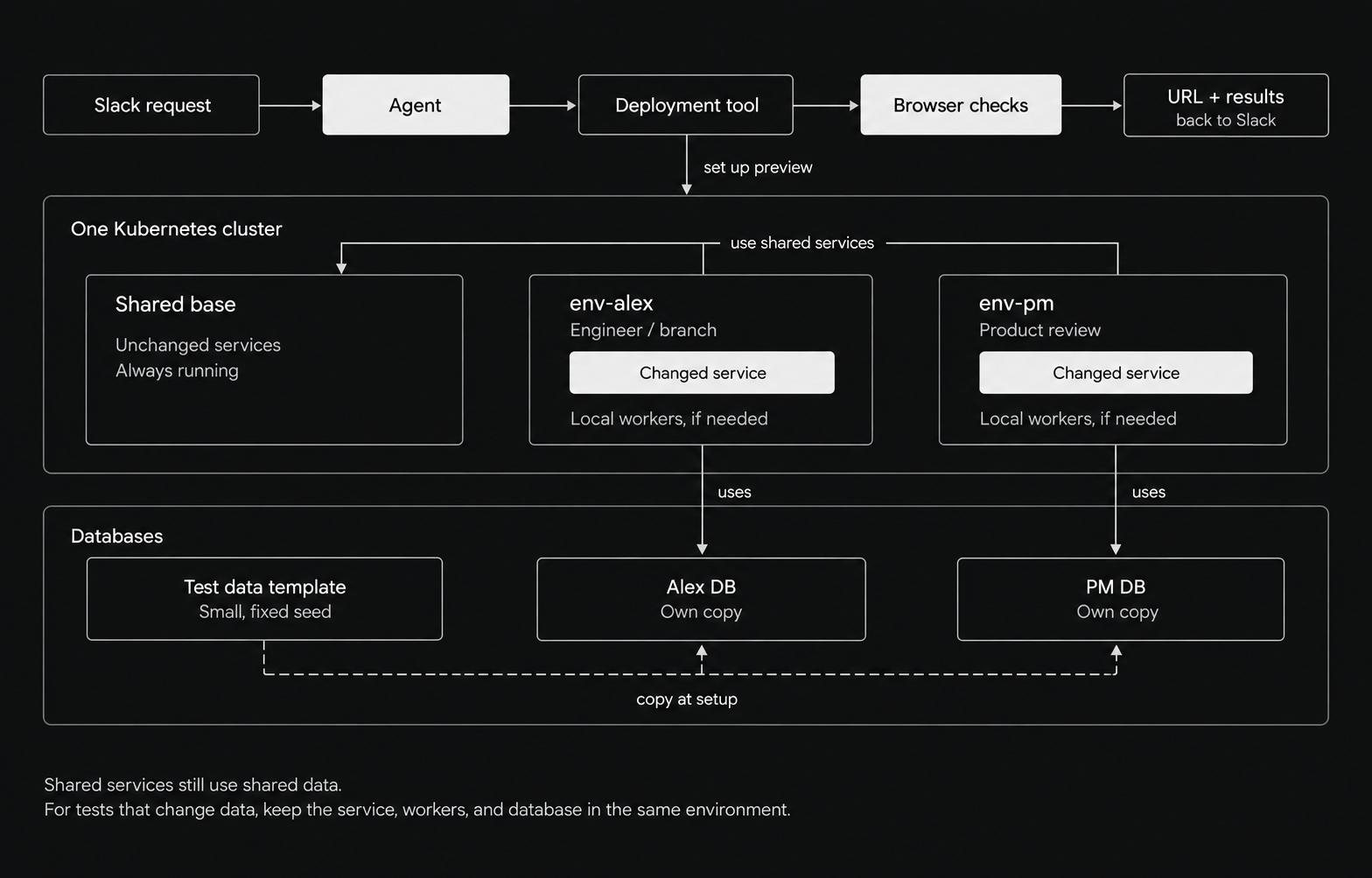
There are four main pieces:
- One staging cluster. Ours runs on GKE.
- A shared base. A working version of the app's services.
- Your namespace. Your own copies of the services you need to test.
- A database template. A starting set of data that we can copy for a test.
The choice was how much to copy. A full copy of every service would repeat a lot of work. With a shared base, each preview only starts the services it needs. The tradeoff is that we have to be clear about what remains shared.
For example, env-alex can run Alex's API change, while env-pm runs a version a product manager wants to review. Each can use its own database copy and a shared catalog.
If a test only needs a frontend change, it can use shared APIs. If it changes data, we need to check that the API handling the write uses the right database.
How a service finds the shared base
Our services use short names to call each other. An API calls catalog, for example.
If catalog is running in that namespace, the call reaches that copy. Otherwise, we create a Kubernetes Service that points to the shared one:
apiVersion: v1
kind: Service
metadata:
  name: catalog
  namespace: env-alex
spec:
  type: ExternalName
  externalName: catalog.stag-base.svc.cluster.local
  ports:
    - port: 8080
ExternalName is a DNS alias. It gives the service another name; it does not copy the service. Applications must accept that name, including in any HTTP host checks or TLS certificates. Kubernetes docs
One detail is easy to miss: a shared service still makes its own calls from the base namespace. If your API calls shared service B, and B calls C, B will reach the base C. To test changes across that whole chain, run the needed services in your namespace too.
Give the test its own data
For a small PostgreSQL template, making a copy is simple:
-- Run from another database, with no clients connected to seed_v1.
CREATE DATABASE env_alex TEMPLATE seed_v1;
The new database is separate, but it lives on the same database server. Copying it takes space and I/O. The source must have no other active connections during the copy. PostgreSQL docs
Use small, fixed test datasets. Create the copy once when the environment starts. Restarting a service or rerunning the setup command should keep the data you already have.
Then point the local API and its workers at that copy. Before testing, run any database migrations needed by the build. These update the database schema.
Having a copy does not help if your test still calls a shared API. That API will keep using its own database.
Our setup also has a large shared dataset, so every test does not get a separate copy of every database. Tests that delete or change shared data need a different setup. If you want to copy a colleague's active database, plan a quiet copy window or use a suitable backup-and-restore method.
Queues need the same care. We run a task broker per environment so that one environment's worker does not pick up another's jobs. Test email, payments, file uploads, and other outside systems need test accounts or separate destinations too.
Ask for the preview in Slack
A request can look like this:
@agent deploy a preview for this PR and check the login flow.
The agent calls a deployment tool with a few checked inputs, such as the PR and the test to run. The tool handles the setup.
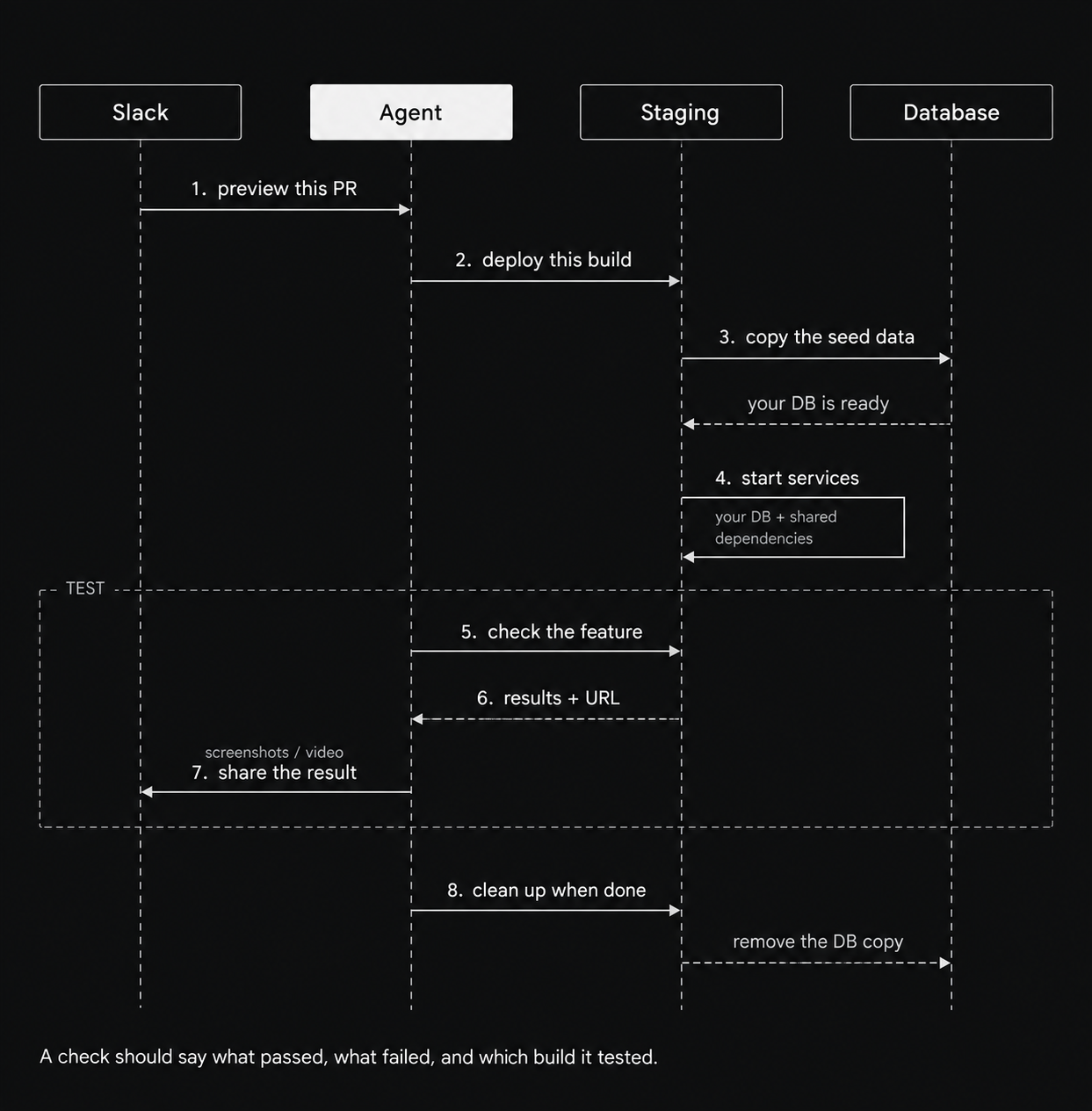
In the diagram, “staging” includes the deployment tool and the preview. This is the flow to build:
- Check who made the request and which PR they want to test.
- Find the build for that PR.
- Create the namespace, copy the needed data, and start the selected services.
- Wait for the app to be ready.
- Run the requested test with a staging test account.
- Send the URL, result, and screenshots or video back to Slack.
- Remove the preview and its data when they are no longer needed.
Our preview tooling already includes a staging deployment command, health checks, and browser checks using Playwright. A team can start with a working command and let the agent call it.
Give the agent four actions: create, test, check status, and remove. Let the deployment tool build and check the commands. For a Slack app receiving HTTP requests, verify Slack's signature before accepting them. Slack docs
Two checks matter here. First, confirm that the container image really came from the requested commit. Then pin its digest, the exact image identifier, so the preview keeps running that build. A branch name alone can point to an older image.
Second, say what the test actually checked. “The app started” is useful. “Login worked with the test account” tells us more. A feature needs a test that checks its own behavior.
Keep track of what you create
Each preview should have an owner, a branch, and an expiry time.
Cleanup must include the database and any other resources created for that preview. Deleting a namespace does not delete a database on a separate server. Keep enough information to retry cleanup if part of it fails.
For a team cluster, set access rules, resource limits, and network rules. A namespace groups resources; it does not provide complete isolation by itself. Kubernetes docs
Sharing the base means each preview starts fewer services. You still pay for those new services, database copies, and test runs. Measure the cost before putting a savings number on it.
Try it locally
The example repository builds a small environment with synthetic data. It creates a local Kubernetes cluster using kind. You need Git, Bash, Docker running, kind, kubectl, and openssl. kind setup
The full example is on GitHub. The Bash script handles setup and cleanup. The manifests folder holds the Kubernetes YAML, and demo-app holds the sample API that runs inside a container. You can also download the files as a ZIP.
Run:
git clone https://github.com/Finrep-ai/kubernetes-preview-environments.git
cd kubernetes-preview-environments

bash env_demo.sh init
bash env_demo.sh up alex
bash env_demo.sh up pm-review
bash env_demo.sh test alex
bash env_demo.sh test pm-review
Each preview gets an API and its own database copy. Both use the shared catalog. They start with the same toy API code.
The test writes through the preview API, reads the result back, and checks that the base data did not change. It also checks that the preview's database login cannot connect to the base database. Both previews passed these checks in the local run.
To try a code change, build a compatible image and run IMAGE=your-demo-image:v2 bash env_demo.sh up alex. The app must use PostgreSQL PG* connection settings, listen on port 8080, and answer GET /. Adapt the checks for your app. Public images can also be passed by digest; private registry access is not included.
This script covers the basic setup and HTTP checks. The Slack connection, browser tests, workers, and automatic expiry need to be added for a team setup. It has no network or user access rules for separate teams. The database uses temporary storage and is lost if its pod is replaced. Run the commands one at a time.
Clean up with:
bash env_demo.sh down alex
bash env_demo.sh down pm-review
bash env_demo.sh destroy
Start with one service your team changes often. Give it a namespace, a copy of its test data, and one check that exercises the feature. Make setup, testing, and cleanup repeatable, then let an agent call those commands.
The next useful measure is the time from a ready build to a reviewed result. Track how long setup takes, how often checks fail because of the environment, and how much manual work a reviewer still needs to do. Those numbers will tell you whether testing is keeping up with the features you want to ship.